llama.cpp
Use llama.cpp when you want to run a model locally and
connect with fast-agent.
fast-agent configures llama.cpp models as local model overlays.
The import command discovers the model from a running llama-server, reads runtime
metadata such as context window and output limits, and writes an overlay into the
active fast-agent home.
The generated overlay uses the openresponses provider with the normalized /v1
base URL, so the imported model can be selected like any other model name.
Start llama-server
Start llama-server with your chosen model. For example:
By default, fast-agent looks for llama.cpp at:
You can pass either the server root or /v1 URL; fast-agent normalizes root URLs
to /v1 for runtime requests.
Import interactively
Run:
This opens an interactive picker, discovers available models, interrogates the selected model, and writes a model overlay.
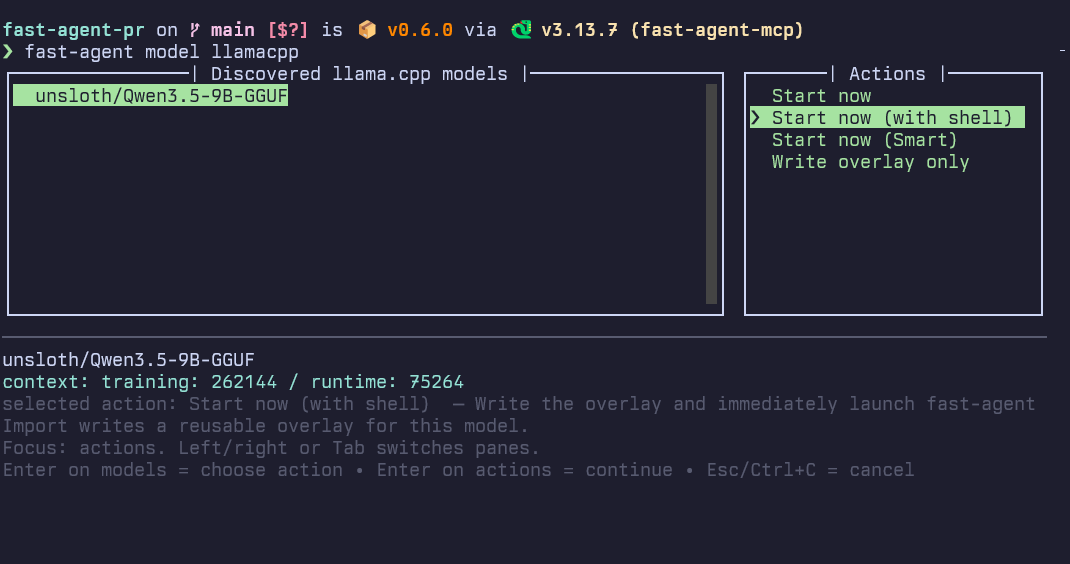
Choose Start now if you want fast-agent to launch immediately with the imported overlay.
Discover and import from the shell
List discovered models:
Use --json for machine-readable output:
Preview the overlay YAML without writing it:
fast-agent model llamacpp preview \
  --url http://localhost:8080 \
  meta-llama/Llama-3.2-3B-Instruct \
  --name llama-local
Import a model as a named overlay:
fast-agent model llamacpp import \
  --url http://localhost:8080 \
  unsloth/Qwen3.5-9B-GGUF \
  --name qwen-local
The overlay is written under the active fast-agent home's model-overlays/ directory.
Use it with:
Start immediately after import
The non-interactive import command can launch fast-agent after writing the overlay:
fast-agent model llamacpp import \
  --url http://localhost:8080 \
  unsloth/Qwen3.5-9B-GGUF \
  --name qwen-local \
  --start-now
Add --with-shell to start with shell execution enabled:
fast-agent model llamacpp import \
  --url http://localhost:8080 \
  unsloth/Qwen3.5-9B-GGUF \
  --name qwen-local \
  --start-now \
  --with-shell
Authenticated llama.cpp endpoints
For local servers, no persisted auth is usually needed. For authenticated or remote
llama.cpp-compatible endpoints, use --auth env with --api-key-env:
fast-agent model llamacpp import \
  --url https://lab.example \
  unsloth/Qwen3.5-9B-GGUF \
  --name qwen-lab \
  --auth env \
  --api-key-env LLAMA_CPP_TOKEN
You can also persist a secret reference:
fast-agent model llamacpp import \
  --url https://lab.example \
  unsloth/Qwen3.5-9B-GGUF \
  --name qwen-lab \
  --auth secret_ref \
  --secret-ref llama-cpp-token
For discovery-only commands, --api-key-env and --secret-ref are used only to
query the server.
Sampling defaults
By default, generated overlays store discovered capability metadata and output limits, but they do not freeze the server's current sampling policy.
Use --include-sampling-defaults if you want to persist llama.cpp sampling defaults
such as temperature, top_k, top_p, and min_p in the overlay:
fast-agent model llamacpp import \
  --url http://localhost:8080 \
  unsloth/Qwen3.5-9B-GGUF \
  --name qwen-local \
  --include-sampling-defaults
Overlay reuse
Repeated unnamed imports of the same llama.cpp model on the same normalized base URL
reuse the existing generated llamacpp-* overlay instead of creating another
suffixed file.
Pass --name when you want an explicit overlay name or a separate copy.
See also
- Model Overlays for the overlay manifest format and precedence rules.
- Command switches for command-line examples.